
What Is an SSL Certificate Chain?
An SSL certificate chain, also called a chain of trust, links your website's certificate to a root certificate that browsers already trust. It's made up of three parts: your server's certificate, one or more intermediate certificates, and a root certificate. Each certificate is signed by the one above it, so a browser can follow the chain up and confirm the whole thing is legitimate.
On this page
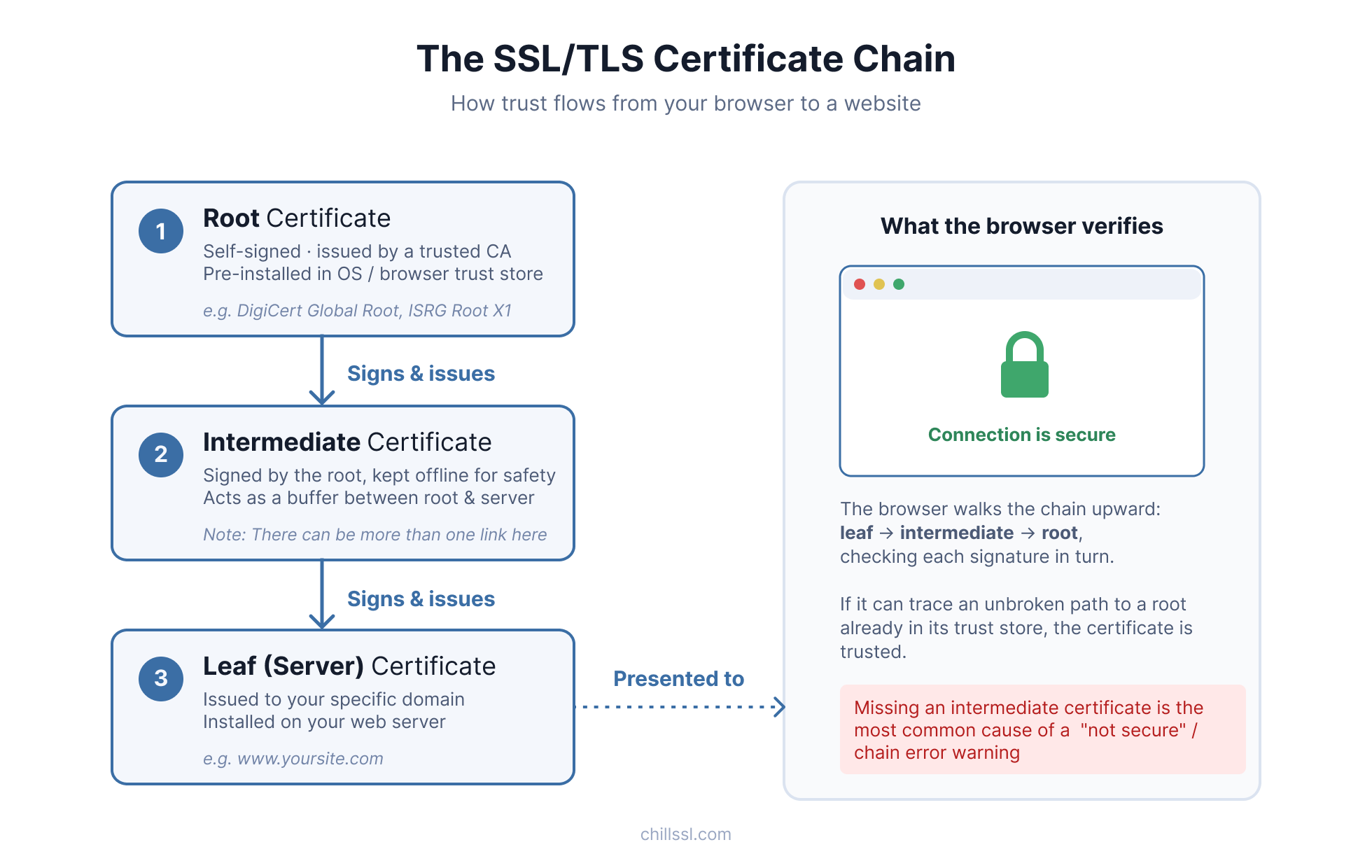
How the chain works
When a browser checks a certificate, it works backward, one step at a time:
- It checks whether the certificate was issued by a CA it already trusts.
- If not, it checks whether that CA's own certificate was issued by a trusted CA.
- It keeps checking, one level up, until it either finds a trusted root or runs out of chain to check.
If it finds a trusted root, the connection is marked secure. If it doesn't, the browser shows a warning, even if your certificate itself is perfectly valid.
The three certificates in the chain
1. Root certificate
Self-signed and already built into every major browser and operating system. This is the actual anchor of trust. If a chain leads back to a root that's already in that trust store, it's accepted.
2. Intermediate certificate
Issued by the root, but kept separate from it on purpose. It's a safety buffer. If an intermediate is ever compromised, it can be revoked without touching the root itself.
3. Leaf (server) certificate
Issued to your specific domain and installed on your server. This is what a browser sees first when it connects, and it's where the check starts. See end-entity certificate.
A worked example
Say you buy a certificate for yoursite.com from a certificate authority called Cert Co.
- Cert Co isn't a root authority, so its certificate isn't already trusted by browsers on its own.
- Cert Co's certificate is issued by an intermediate CA called Trust Link.
- Trust Link's certificate is issued by a root CA called Anchor Root, which is already built into every browser.
That gives you a chain of three certificates:
- Leaf certificate: issued to
yoursite.com, issued by Cert Co - Intermediate certificate: issued to Cert Co, issued by Trust Link, which is signed by Anchor Root
- Root certificate: Anchor Root, self-signed and already trusted
When you install your certificate, you need to bundle the intermediate certificate along with it. Miss that step, and some browsers won't be able to complete the chain, even though your certificate is valid.
Why intermediate certificates exist
Root CAs keep their root certificates offline and locked down, since they're the foundation everything else relies on. Instead of issuing certificates directly, they delegate that job to intermediate CAs.
This creates a safety boundary. If an intermediate CA is ever compromised, only the certificates it issued are affected. The root itself, and everything else that depends on it, stays safe.
What happens when the chain is broken
This is the error behind most "your connection is not private" warnings that catch site owners off guard.
- Your leaf certificate is valid and hasn't expired.
- But the intermediate certificate wasn't installed alongside it.
- So the browser can't complete the path to a trusted root, and it shows an error.
Some browsers cache intermediate certificates from other sites they've visited, which can mask the problem. That's why a broken chain can look fine on one device and throw errors on another.
If this is happening on your own site right now, here's the fix: How to Fix a Missing Intermediate Certificate →
Inspect your own chain
ChillSSL's certificate details view breaks down the full chain (root, intermediate, and end-entity) so you can see exactly what is installed for your domain, not just whether the padlock appears in a browser.
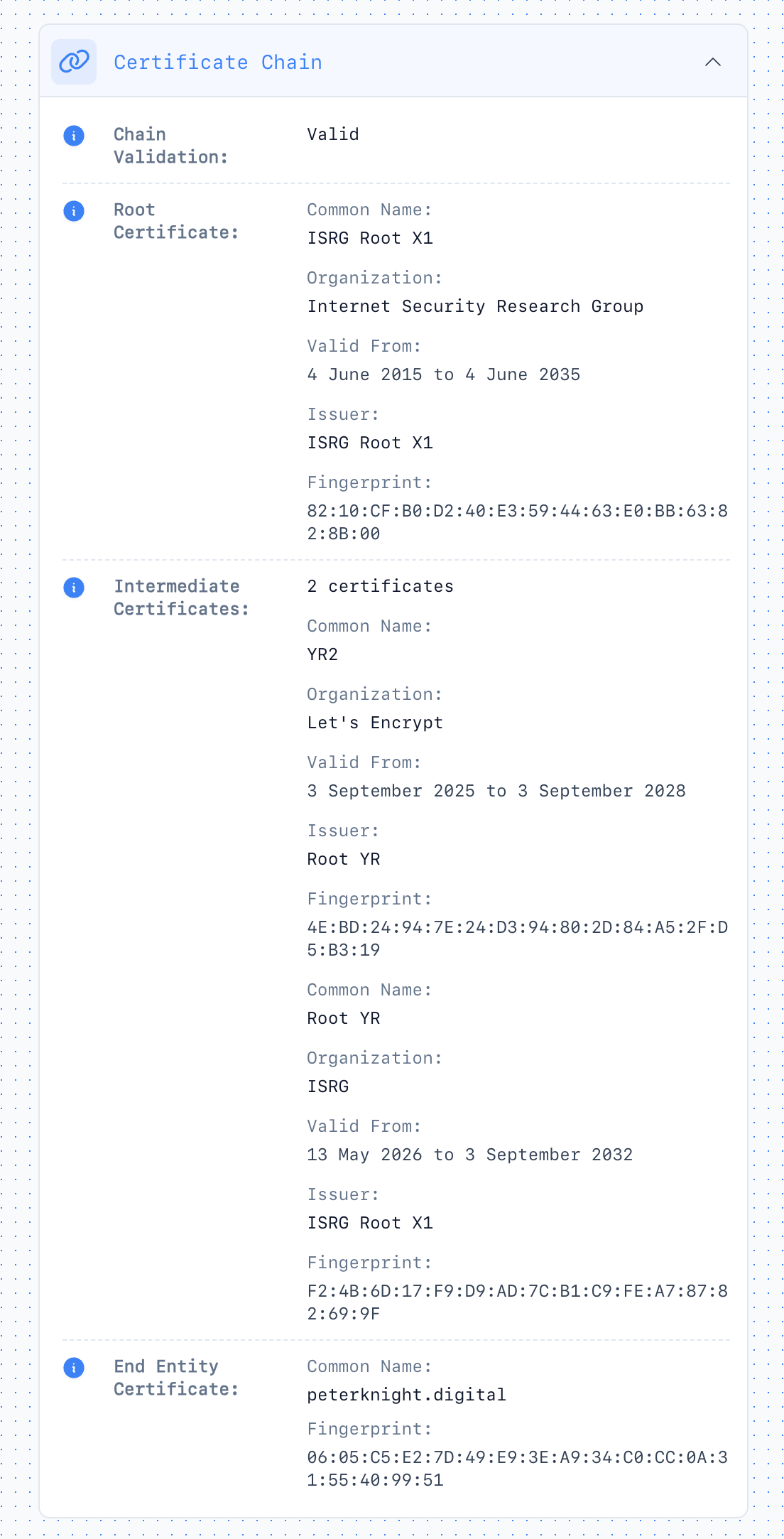
A few things worth checking once you can see the chain:
- Is your server sending the full chain, not just the leaf certificate?
- Are you using the intermediate your CA currently issues, not an old or deprecated one?
- Does the chain validate the same way in Chrome, Firefox, and a plain
openssl s_clientcheck?
From the terminal, check your certificate chain with OpenSSL using s_client -showcerts. For background on the toolkit, see what OpenSSL is.
Start SSL monitoring → to inspect certificate details and get alerts before a broken chain or renewal gap becomes an outage.
If your chain comes back incomplete, the missing intermediate certificate guide walks through diagnosis and fix step by step.