
SSL Troubleshooting Guide
How to Fix a Missing Intermediate Certificate
On this page
How to tell this is your problem
You're likely dealing with a missing intermediate certificate if:
- Your certificate hasn't expired, and the domain name matches.
- The site loads fine in some browsers or on some devices, but not others.
- The error mentions something like "unable to get local issuer certificate" or simply "not secure," rather than a clear expiry or name mismatch message.
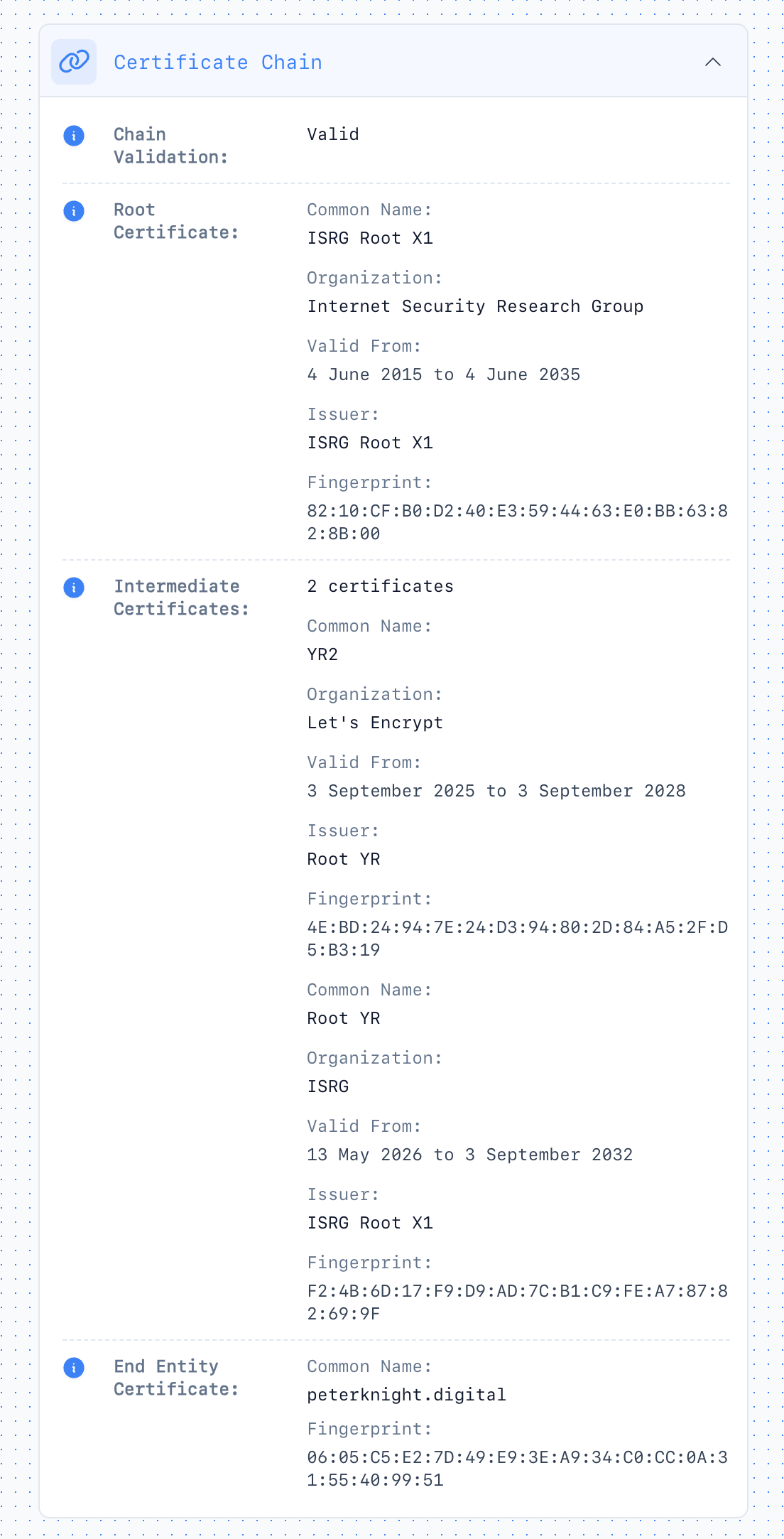
Add your domain in ChillSSL and open the certificate details view. You should see root, intermediate, and end-entity certificates listed separately. If the chain stops after the leaf certificate, or the intermediate card is missing, that confirms the problem.
If you'd rather understand the underlying concept first, see what an SSL certificate chain is.
Why this happens
When your certificate authority issues your certificate, it also gives you an intermediate certificate that links your certificate back to a trusted root. Your server needs to send both your certificate and the intermediate every time a browser connects.
If only the leaf certificate gets installed, most desktop browsers will fail the check. Some mobile browsers and some desktop browsers cache intermediate certificates they've seen from other sites, so the same broken setup can look fine in one place and fail in another. That inconsistency is usually what confuses people first.
Behind Cloudflare in Full (strict) mode, an incomplete origin chain often surfaces as Error 526 rather than a generic browser warning.
The fix
1. Get the correct intermediate certificate
Log into your certificate authority's dashboard and download the intermediate certificate (sometimes called a "CA bundle" or "chain file") that was issued with your certificate. Don't reuse an old one from a previous certificate. CAs rotate these periodically, and using an outdated intermediate causes the same error.
2. Add it to your server configuration
Once you have the correct intermediate certificate, it needs to be installed alongside your leaf certificate so your server presents both together. Exactly how you do that depends on what you're running, and the steps change often enough between versions that we'd rather point you to the source than risk giving you a stale command:
- Apache: Apache SSL/TLS configuration docs
- Nginx: Nginx SSL configuration docs
- IIS: Microsoft's guide to installing certificates on IIS
- Cloudflare (Full strict mode): the fix happens on your origin server, using whichever guide above matches it. Cloudflare's edge certificate is separate and doesn't need changes.
If your hosting provider or CA manages this for you, most support teams can complete this in a few minutes, since it's a routine request.
3. Reload your web server
Certificate changes usually need a reload or restart to take effect, not just a saved file. Your hosting control panel or the docs linked above will cover the exact command for your setup.
Verify it worked
Re-check in ChillSSL's certificate details view. You should now see the intermediate certificate between the leaf and root.
Or from the command line:
openssl s_client -connect yoursite.com:443 -showcertsLook for the full chain in the output: your certificate, the intermediate, and confirmation it resolves to a trusted root. If the intermediate is present, you should also see Verify return code: 0 (ok) near the end of the output.
Our OpenSSL certificate guide covers this check and the rest of the usual commands. New to the toolkit? See what OpenSSL is.
Test in more than one browser. If it was working in some browsers before your fix, that cached-intermediate behavior means a clean, private/incognito window is a more reliable test than your regular browser session.
Prevent it happening again
This usually resurfaces at certificate renewal, especially if your CA rotates its intermediate certificate between issuances. A few ways to stay ahead of it:
- Re-check the chain any time you renew or reissue a certificate, not just on first install.
- Automate renewal where possible, so the current intermediate gets bundled correctly every time.
- Get notified before something breaks rather than after. ChillSSL's monitoring tracks your certificates and flags changes before they turn into an outage.