

Custom SSL Reminder Alerts
Create custom alerts for any timeframe. Set thresholds before or after expiry with custom labels. Track expired certificates for compliance with live preview and complete audit trail.
Track SSL certificates with pre-expiry and post-expiry alerts
- Track certificates after expiry for compliance and audit trails
- Create custom thresholds with custom labels
- Live preview shows qualification counts before enabling
- Match your exact workflow and deployment schedule
Create Custom SSL Certificate Alerts
The built-in threshold presets cover common scenarios. Custom thresholds let you go further — any time value, before or after expiry, with labels that mean something to your team.
Any Time Value
Set alerts for any number of days or hours. 17 days, 23 hours, 5 days — whatever fits your deployment cycle.
Before OR After Expiry
Standard thresholds only go before expiry. Custom thresholds let you set alerts after expiry too — essential for compliance tracking.
Live Preview
Before you save a threshold, see exactly how many certificates would qualify right now. No surprises, no guessing.
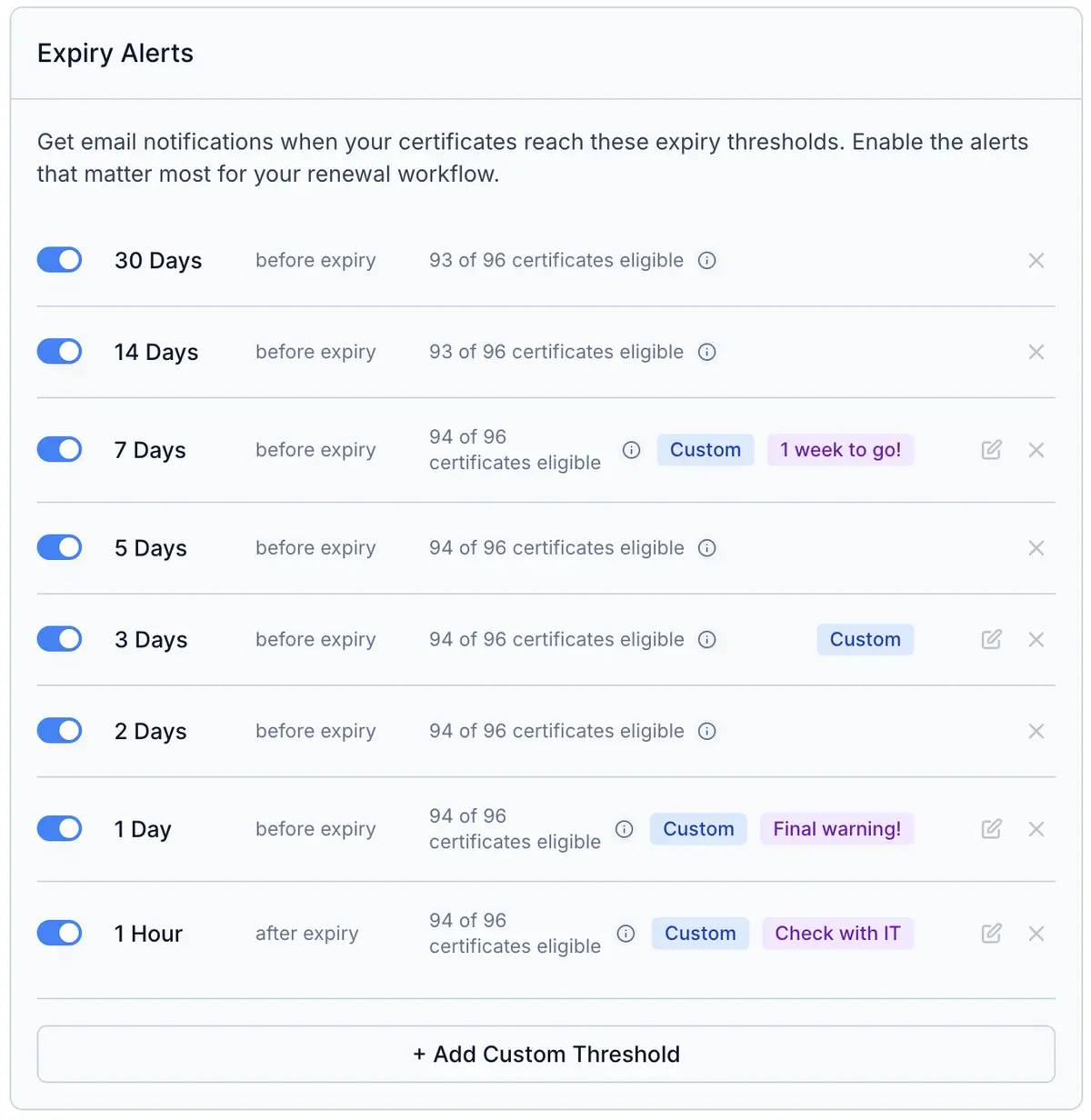
Before and After Expiry Alert Positioning
Before Expiry
Advance warnings for renewal planning
Weekend Deployment
Create "23 hours before" labeled "Weekend Warning" for Friday afternoon alerts before Saturday morning renewals.
Non-Standard Timeline
Create "17 days before" for specific deployment cycles that don't match standard 14 or 30-day thresholds.
Tight Windows
Create "6 hours before" for short-lived dev certificates that need precise timing for renewal.
After Expiry
Post-expiry compliance tracking
Compliance Team
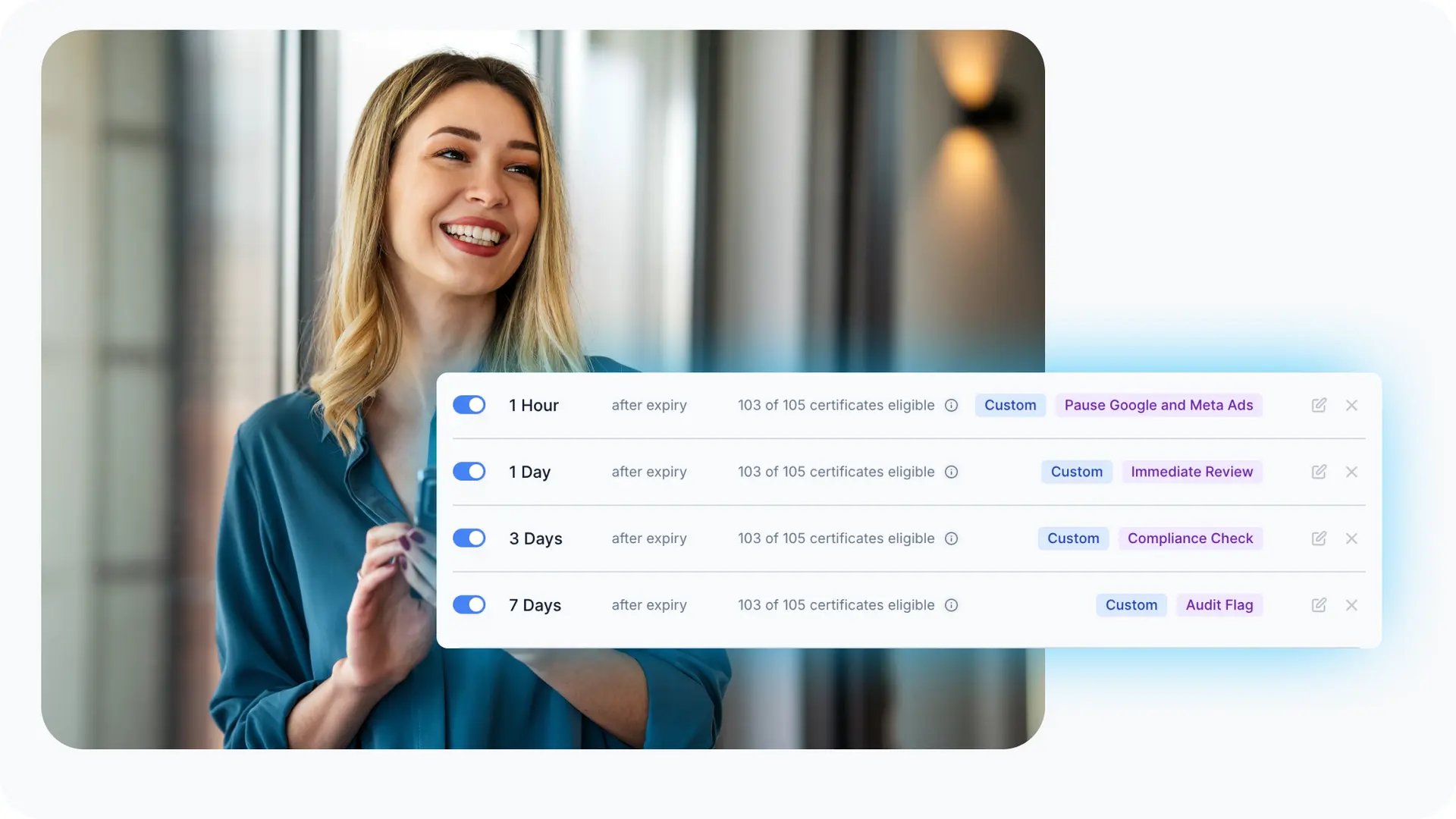
Create "1 day after", "3 days after", "7 days after" labeled "Immediate Review", "Compliance Check", "Audit Flag" for complete tracking.
Incident Documentation
Track how long certificates remain expired for security incident reports and regulatory compliance documentation.
Graduated Escalation
Combine with "Expired" status alert for notification when expiry is detected, then use post-expiry thresholds for follow-up escalation.
Post-Expiry Compliance Tracking for SSL Certificates
Expired certificates aren't just operational failures. They're security incidents and compliance events. Organizations need comprehensive tracking for regulatory compliance.
What You Need to Document:
- How long certificates remained expired before remediation
- Which systems were affected by expired certificates
- Response time for security incidents
- Audit trails for regulatory compliance (SOC 2, ISO 27001, PCI DSS)
- Escalation procedures and who was notified when
Two-Tier Approach to Expired Certificate Tracking:
1. Enable "Expired" Status Change Alert (Recommended)
Notification when a certificate expires (detected within 6 hours). This is your first line of defense and marks the beginning of the security incident.
2. Create Custom Post-Expiry Thresholds
Graduated escalation for remediation tracking. Example configuration:
- 1 day after expiry: "Immediate Review" - First escalation point
- 3 days after expiry: "Compliance Check" - Management notification
- 7 days after expiry: "Audit Flag" - Serious compliance issue
This two-tier approach ensures nothing slips through the cracks and provides complete documentation for audits and compliance reviews.
Custom Labels for Certificate Alert Organization
Give your thresholds descriptive names (up to 50 characters) to understand their purpose at a glance. Labels appear in your Expiry Thresholds settings and are carried forward into your email notifications.
Workflow Labels
- • "Weekend Warning"
- • "Friday Afternoon Alert"
- • "Monday Morning Check"
Escalation Labels
- • "Manager Escalation"
- • "Team Lead Notice"
- • "C-Level Alert"
Compliance Labels
- • "Compliance Check"
- • "Audit Flag"
- • "Security Incident"
Urgency Labels
- • "Final Notice"
- • "Immediate Action Required"
- • "Last Chance Warning"

Real-Time Certificate Qualification Preview
Before saving a custom threshold, Chill SSL shows you, in real time, how many of your certificates will qualify for that alert.
This matters most for short-lived certificates (like Let's Encrypt's 6-day or 30-day IPv6 certs). If you set a long threshold such as 30 or 90 days, those certs will never reach it, leaving a blind spot in your alert coverage.
By previewing instantly that, for example, "5 of your 94 certificates won't qualify for this threshold," you can fine-tune the timing to ensure complete coverage.
It's a simple safeguard that prevents wasted thresholds and unnecessary notifications, reducing alert fatigue before it starts.
How It Works
1️⃣ Enter your time value
Type any number, for example, 17 days or 23 hours.
2️⃣ Select before or after expiry
Choose whether the alert triggers ahead of expiry or after it passes.
3️⃣ See qualification count instantly
As you adjust values, the display updates live:
"85 of your 94 certificates will qualify" or "0 certificates will qualify."
🔍 Why It Matters
- No surprises: you always know what each alert will capture
- Smarter configuration: optimize for short-lived and long-life certs alike
- Fewer dead thresholds: more relevant, actionable alerts
In one glance, you know which alerts matter and which ones never will.
Traditional SSL Monitors vs Chill SSL Continuous Monitoring
Where other platforms go quiet, Chill SSL keeps watching: before, during, and after expiry.
Traditional SSL Monitors
🚫 Alerts stop at expiry. Once the certificate expires, the system goes silent
Chill SSL Continuous Monitoring
✅ Alerts continue after expiry. We keep monitoring and notifying post-expiry until the issue is resolved
Traditional SSL Monitors
⚠️ Awareness ends when the problem begins
Chill SSL Continuous Monitoring
🧠 Visibility continues through resolution. You know exactly when expiry happened and how long it remains unresolved
Traditional SSL Monitors
📭 Single pre-expiry reminders only (30/15/7 days)
Chill SSL Continuous Monitoring
🔁 Adaptive thresholds before and after expiry: 30, 15, 5, 1, 0 days and +1 / +5 / +15 days post-expiry
Traditional SSL Monitors
💤 No accountability. Once missed, there's no audit trail
Chill SSL Continuous Monitoring
🗂️ Full audit history: every expiry and recovery event is timestamped for compliance and RCA
Traditional SSL Monitors
🔕 Risk of silent failure. The world sees an expired cert, but no one inside notices
Chill SSL Continuous Monitoring
🔔 Persistent awareness without spam. Reminders taper intelligently once acknowledged
Traditional SSL Monitors
🧩 Disjointed lifecycle tracking. Renewal, expiry, and post-expiry handled separately
Chill SSL Continuous Monitoring
🔄 Complete lifecycle coverage: one system tracks from issuance to renewal to post-expiry recovery
Traditional SSL Monitors
🤷♂️ You hope someone spots it
Chill SSL Continuous Monitoring
🛡️ You'll spot and fix it before your customers, boss or clients do!
Bottom Line:
Where other platforms go quiet, Chill SSL keeps watching. Continuous awareness, cleaner inbox, zero blind spots.
Frequently Asked Questions
Common questions about custom SSL expiry thresholds.
Related SSL resources
SSL troubleshooting guides
SSL glossary
SSL reminders & notifications
Create Custom SSL Certificate Alerts Today
Set thresholds that match your exact workflow — before or after expiry, with custom labels and live qualification previews.