

15% off — early members →
15% off for early members. EARLYACCESS15 Applied at checkout. View pricing →
Professional managing SSL certificate email notifications and alerts

Automated SSL Email Alerts to Suit Your WorkFlow

Get the right email alerts at the right time. Monitor SSL status changes, set custom reminder thresholds and receive scheduled summaries. All adapating to your workflow to prevent alert fatigue.

Choose your SSL email alert type

Key Benefits

  • Expiry notifications before downtime
  • Track certificates after expiry for compliance
  • Prevent alert fatigue with smart digests
  • Confidence your auto-renewals succeeded. No more guessing or assuming.
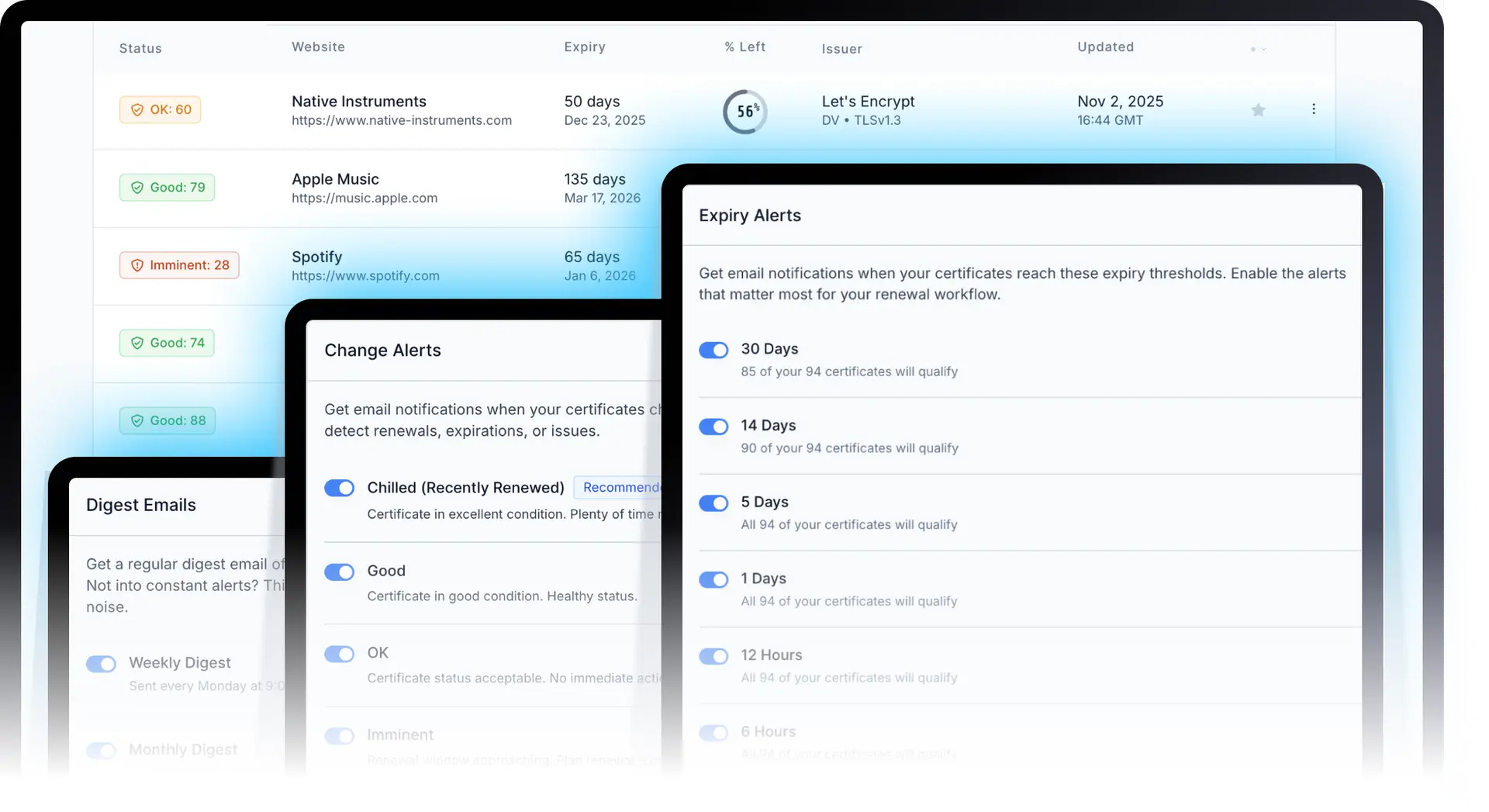
Notification Settings Dashboard Overview showing all 4 notification types in one interface

Which SSL Email Alerts Do You Need?

Pick the workflow that matches how you want to verify and stay on top of SSL certificates. Most teams combine two or three. Enable what you need, skip what you do not.

Weekly or monthly

“I want a scheduled email that verifies all my certificates in one place.”

SSL Digest Emails

Weekly or monthly SSL portfolio summaries. One email to verify certificate health across every domain you monitor, without constant alerts.

  • Weekly or monthly SSL report
  • Complete certificate portfolio overview
  • Ideal for managers and oversight
  • Reduce alert fatigue
Get weekly or monthly digest emails

Before or after expiry

“I want SSL reminder emails before expiry, at thresholds I choose.”

SSL Reminder Emails

Expiry threshold alerts at day- or hour-based intervals you control, including post-expiry reminders for compliance tracking.

  • SSL expiry reminder emails
  • Custom day- and hour-based thresholds
  • Post-expiry certificate tracking
  • Certificate qualification counts
Set up SSL reminder emails

On change

“I want alerts when a certificate renews, expires, or changes status.”

Status Change Alerts

Continuous SSL certificate monitoring with alerts when something changes. Verify renewals succeeded, catch failures fast, and track the full certificate lifecycle.

  • Renewal and expiration notifications
  • Verify auto-renewals actually worked
  • Multiple automatic scans per day
  • Manual scans anytime
Turn on status change alerts

Custom Expiry Thresholds

Advanced Feature

Create custom thresholds with any time value, before OR after expiry, with custom labels.

  • Flexible time values (17 days, 23 hours, etc.)
  • Before or after expiry positioning
  • Custom labels for organization
  • Live preview with certificate counts
  • Post-expiry compliance tracking
  • Fully customizable and editable
Learn more

No Alert Fatigue

Smart SSL Certificate Monitoring Without Alert Spam

Most monitoring tools either spam you with alerts or miss critical events. We give you precisely what you need, when you need it.

Certificate Qualification Counts
See exactly how many certificates will trigger each alert before you enable it. Make informed decisions, not guesses.
Post-Expiry Compliance Tracking
Track expired certificates with custom "after expiry" thresholds. Complete audit trails for regulatory compliance.
Smart Deduplication
Never receive the same alert twice unless something changes. Intelligent tracking prevents notification spam.

Frequently Asked Questions About SSL Certificate Notifications

Get answers to common questions about our intelligent notification system.

We offer three core SSL email alert types, plus optional custom expiry thresholds. Digest emails send scheduled weekly or monthly portfolio summaries. SSL reminder emails warn you before (or after) expiry at thresholds you choose. Status change alerts notify you when a certificate renews, expires, or changes status. See which alert type fits your workflow.
Digest emails are scheduled summaries (weekly or monthly) that verify your whole SSL portfolio in one email. SSL reminder emails fire when a certificate crosses an expiry threshold you set, such as 30 days, 14 days, or 1 hour before expiry, or after expiry for compliance. Use digests for oversight; use reminders when you need lead time to renew.
Many teams use both. A weekly digest verifies overall portfolio health on a schedule, but it will not tell you the moment a renewal fails or a certificate expires. Status change alerts monitor continuously and notify you when something changes, so you can act before the next digest arrives.
Our certificate qualification counts show you exactly how many certificates will trigger each alert before you enable it. Combined with smart deduplication that prevents repeat notifications, you only get relevant alerts. You can also use digest emails for scheduled summaries instead of constant notifications.
Yes. Enable 'Expired' status change alerts for notification when certificates expire, then create custom post-expiry thresholds (e.g., 1 day after, 3 days after, 7 days after) for graduated escalation and complete audit trails.
Custom expiry thresholds are an advanced feature of Expiry Threshold Alerts (SSL Reminder Emails) that let you create reminder emails for any timeframe (e.g., 17 days, 23 hours) before OR after certificate expiry. You can add custom labels for organization and see live previews of how many certificates will qualify.
Your certificates are automatically scanned multiple times per day on a rolling schedule. This ensures timely detection of any status changes or expiry events. You can also log into your dashboard at any time to trigger a manual scan for up-to-the-second data whenever you need it.
Yes! Our notifications work with all SSL/TLS certificates including Let's Encrypt, commercial certificates, and self-signed certificates. We support both short-lived (90-day) and long-lived (1-year+) certificates with intelligent threshold recommendations.
We show you exactly which certificates will be affected by each alert before you enable it (certificate qualification counts). We also support post-expiry compliance tracking, custom thresholds for any timeframe, and smart deduplication to prevent alert spam.
Notification settings apply to all your monitored certificates. When enabled, alerts will notify you about specific certificate events (like status changes or expiry thresholds) for individual certificates in your portfolio. Digest emails provide a summary of your entire certificate portfolio on a scheduled basis.

Ready to Stop Missing SSL Certificate Expirations?

Start monitoring your SSL certificates with intelligent notifications. No credit card required.