
Smart SSL Notifications: Custom SSL Alerts Without the Spam

When helpful alerts become noise
Most IT and SysOps teams aren't short on dashboards, emails, or Slack alerts. Multiply that across every diagnostic, redundancy, and security platform they use, and it's easy to see the problem. It's not the lack of alerts or choice of platforms, it's the volume of them. When each alert is marked urgent and competing for attention, that eventually turns into noise and important alerts get missed.
That's what I wanted from smart SSL notifications: custom SSL alerts that only fire when they matter. SSL monitoring without the spam. You decide what you're notified about, how often, and in what format.
At Chill SSL, we already have three great notification types:
- Status Change Alerts
Instant insights when certificates renew or shift state (Critical → Expired, Expired → Chilled (Recently Renewed), etc.). - SSL Reminder Emails
Reminder emails to notify you of certificates approaching expiry at specific timed thresholds. Smart qualification counts tell you exactly how many certificates will trigger that alert before you enable it. - Digest Emails
A clean, rolled-up summary of your SSL portfolio, delivered weekly or monthly.
But, having tested my own SSL alerts for several months with hundreds of certificates and observing the effect on my own inbox (and attention span), one thing stands out: alert fatigue.
So this week, I sat down to improve our email notifications system, and asked myself three simple questions:
- How do we reduce signal-to-noise? Can we keep messages meaningful by filtering out redundant updates and letting users control alert frequency?
- How do we send alerts at the right time? Can we deliver them when action is still possible, giving users a heads-up before a game-over?
- How do we avoid overwhelming users? Can we balance awareness with quiet periods and customizable preferences?
The Balance Problem: Signal vs Scale
Ultimately, I wanted a system that performs equally well at both ends of the scale.
Our Goal:
That led to a rethink. I wanted to evolve our email alerts and build an alert system that scales gracefully. One that keeps noise low, context high and timing meaningful. Crucially, the new system had to work for both small and large portfolios, and for any mix of Certificate lifespans, from 1-year, 90-day, and 6-day short-lived certificates.
Thinking about my own setup, I realised that what I ultimately need is a system that consists of some or all of the following:
1. Tell me when something changes I might care about.
2. Warn me before expiry - and give me options on the frequency.
3. Give me one clean summary instead of dozens of pings.
The result should be a Notifications System that lets you choose how often, when, and in what format I want to be notified.
So that's exactly what I built...
Informed, not overwhelmed.
We hope you'll like the refinements in this update. In short, we've built a calmer, smarter notification system that's more precise, less noisy, and fully aligned with how real SSL teams work.
How Chill SSL Solves It
At its heart, The Chill SSL notification system runs on clarity and choice.
Every automated (and manual) scan checks your SSL certificates, compares them against your preferences, and sends only what matters, with no duplicates and no clutter. It's a simple, yet powerful system that keeps your inbox clean and your notifications relevant.
[Certificate Scan] → [Lifecycle Evaluated] → [Your Preferences Applied] → [Smart Email Sent]Each scan evaluates certificate lifecycles, applies your chosen thresholds, and triggers only the relevant alerts.
Three Notification Types: Your Inbox, Your Rules
We've structured notifications around three real-world needs. Let's look at each.
1. Status Change Alerts
Sometimes you don't need another reminder, you just want to know something happened. Status Change Alerts are perfect when you want to be kept in the loop, without the noise.
These are great when you want instant feedback that your automation or renewals are working correctly (or not).
For example, get an email when a certificate changes status from Critical to Chilled (Recently Renewed), while an unexpected issue moves it to Critical or Expired.
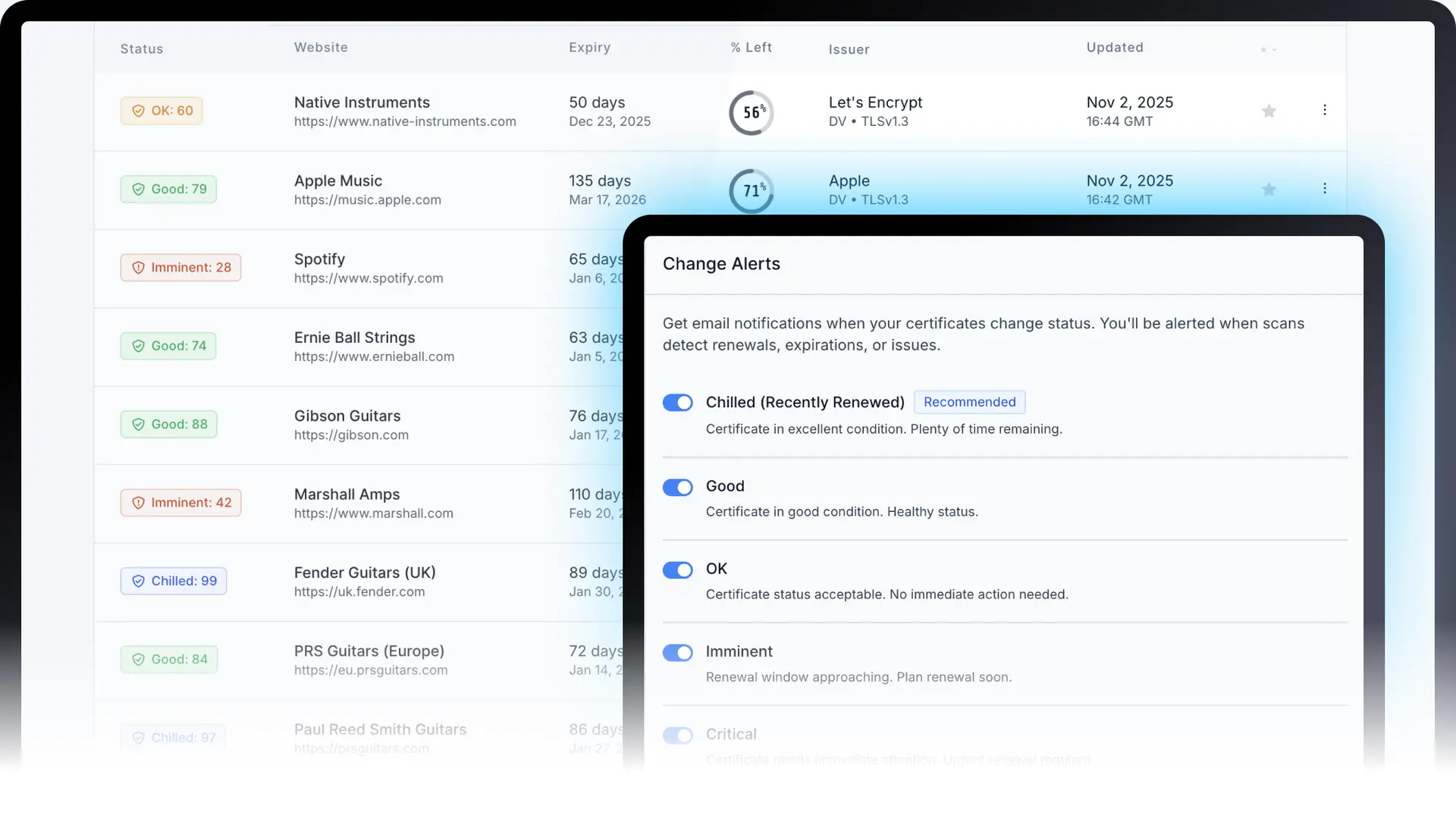
Or if you want to be informed of every certificate change, you can enable Change Alerts for all statuses and keep tabs on the Certificate(s) as it moves through each stage of its lifecycle. I personally wouldn't recommend this for large portfolios, but the beauty of the system is that choice is yours.
I personally find it most useful to switch on Change Alerts for the Chilled (Recently Renewed) and Expired statuses as generally speaking it is these events you are most likely to be interested in.
The full lifecycle states covered: Chilled (Recently Renewed) → Good → OK → Imminent → Critical → Expired.
The system also monitors for Failing (indicating a failed connection to the SSL certificate) and Unknown statuses (when the certificate's status cannot be determined).
Change Alerts - Quick summary:
- Great when you want same-day awareness of certificate changes.
- Ideal for DevOps and IT teams running auto-renewal workflows.
- Helps confirm renewals succeed, not just when they fail.
- Avoids assumptions or guesses about renewals success or failure.
2. SSL Reminder Emails
Sometimes you want to plan ahead, whether that's 30 days, 5 days, or just 12 hours before expiry. SSL Reminder Emails help you get that balance right.
If Change Alerts are a pulse check, SSL Reminder Emails are the calendar check. Both matter. One helps you respond to changes as they're detected; the other helps you plan ahead, whether that's 30 days, 5 days, or just 12 hours before expiry.
Right now you can choose a few pre-defined day-based (30 / 14 / 7 / 3 / 1) or hour-based (12 / 6 / 3 / 1) alerts. These work beautifully for mixed SSL portfolio environments and cater for both 90-day Let's Encrypt and the upcoming 6-day Certificates to come. Longer commercial certificates are also covered.
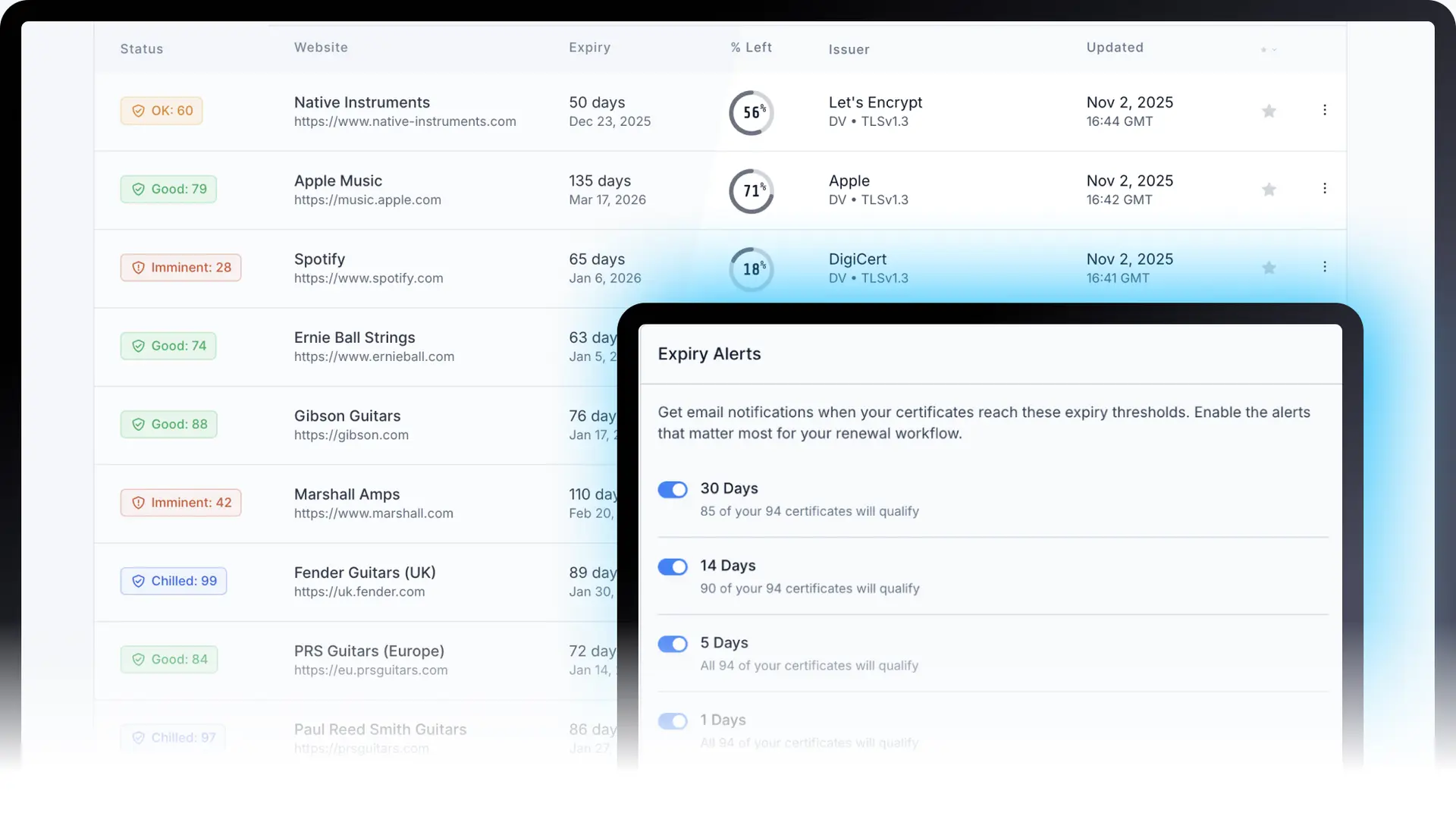
One nice feature is the qualification count, showing how many of your certificates will actually trigger that alert.
Example: "85 of 94 certificates qualify for the 30-day alert."
That means you can skip thresholds that don't apply. For instance, 6-day short-lived certificates won't ever hit a 30-day threshold, and Chill SSL tells you that upfront.
Note: Most of the time your smaller expiry thresholds will never trigger as Certificates are typically renewed (and returning to Chilled status) before they reach the hourly thresholds.
SSL Reminder Emails - Quick summary:
- Perfect for teams managing a mix of certificate types.
- Know in advance which alerts will trigger (no surprises).
- Avoid pointless reminders that add noise instead of clarity.
3. Digest Emails
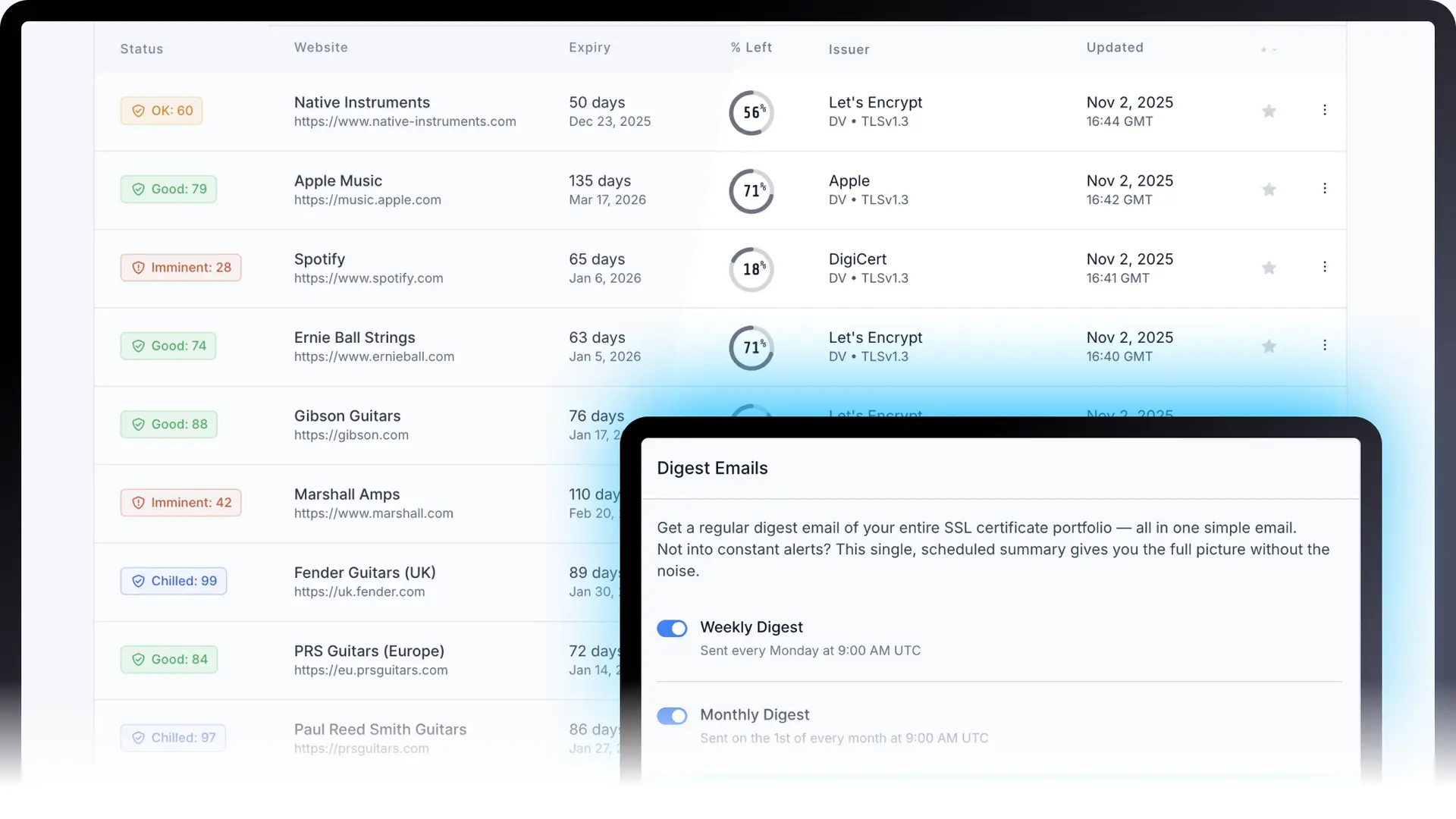
Sometimes you don't want constant alerts, you just want oversight. Digest Emails deliver exactly that: a clean, rolled-up summary at your chosen interval.
You can schedule these to be weekly, or monthly. Each digest includes your total certificates, how many are healthy, which are expiring soon, and links straight to your dashboard.
These are great when you just want a quick, at-a-glance update to start your day or week. I really like starting my Monday mornings with the weekly Digest Email to get a quick overview of my SSL Portfolio.
Digest Emails - Quick summary:
- Ideal for managers, agencies, or multi-domain owners.
- Gives you a full picture in one clean message.
- Keeps your inbox quiet but your visibility high.
Finding Your Notification Style
Every team works differently. Some want instant updates, others prefer a quieter inbox and to work in the Chill Dashboard instead. With ChillSSL, you can tailor notifications to match your own workflow. Whether you prefer detailed, same-day insights or a calm weekly summary, you decide what, how often and when.
- Status Change Alerts: same-day awareness when something changes.
- SSL Reminder Emails: plan renewals with confidence.
- Digest Emails: a clean snapshot to start your week or month.
And finally…
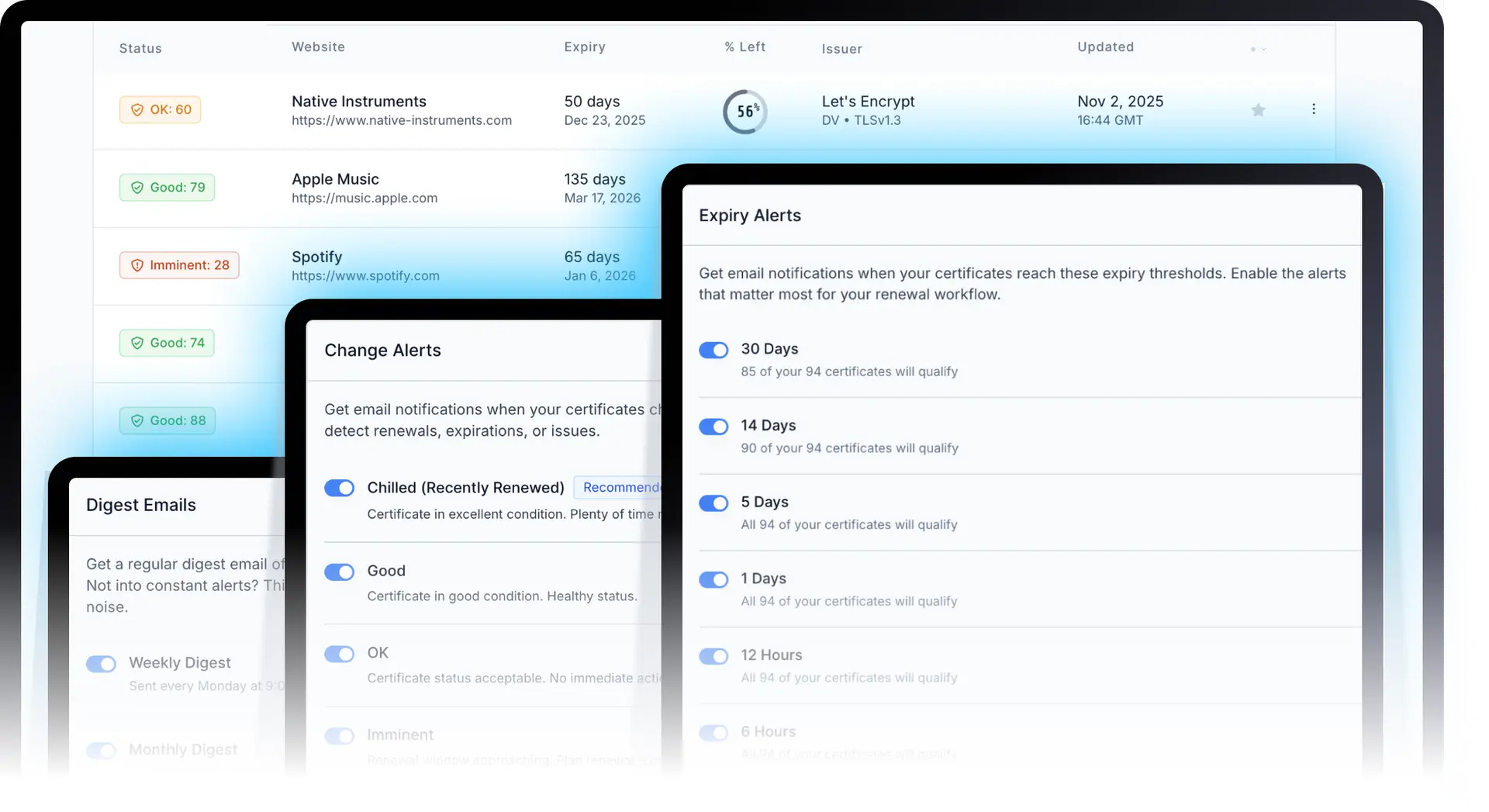
If you're managing a lot of certificates, still fine-tuning your notifications, or just need a bit of quiet time, there's a global on/off switch right at the top of the page.
Turn it off to pause email notifications while you take a break, turn it back on and your previous settings are instantly restored.
(Just remember: SSL certificates don't take holidays, even if you do.)
Slack and Teams are coming soon, but not before they're useful. It's tempting to push alerts everywhere, but more channels don't mean better awareness. We wanted to fix the volume problem first and make sure email notifications felt meaningful and manageable. Once that's right, extending to Slack, Teams, and other platforms will actually make sense, not add chaos.
Peter Knight, Founder, Chill SSL
Glacier Plan Promise
As promised to all Glacier (Launch Edition) customers, you automatically get access to these new features, including digests and advanced alert logic, and can start using them right away. For details on all plans and features, please visit our pricing page. You'll find them under Settings → Notifications.